 Wanko Diary
Turn your dog's photos and videos into an album of memories
Photos that get buried in your camera roll stay with each day's log in Wanko Diary. Look back in the Growth Album, rediscover memories from this time last year, and find them by the places you went together.
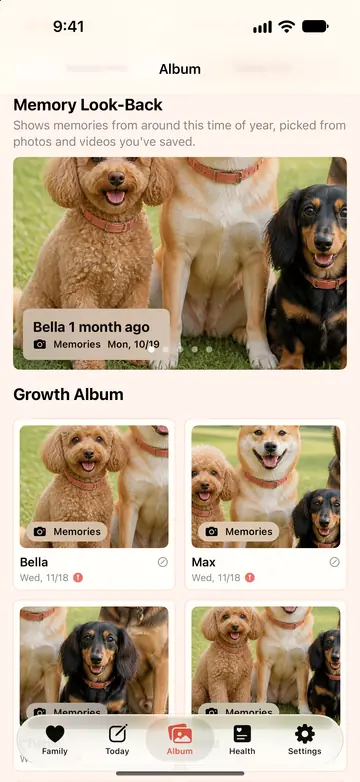
A growth album of photos and videos, kept by date
Photos and videos added to each day's log are gathered into an album automatically. Filter by dog, year and month, or sort newest or oldest first, to follow how your dog has grown.
- Choose and add several photos and videos at once
- Or take them right then with the in-app camera
- With several dogs, look back at each one separately
See photos from this time last year again
Open the Album, and memories from the same time 1 month, 6 months and 1 year ago appear automatically. "Look how small she was!" It's a chance to look back on how your dog has grown, together as a family.
Shown when you have photos or videos from that time.

Find that day by the places you went together
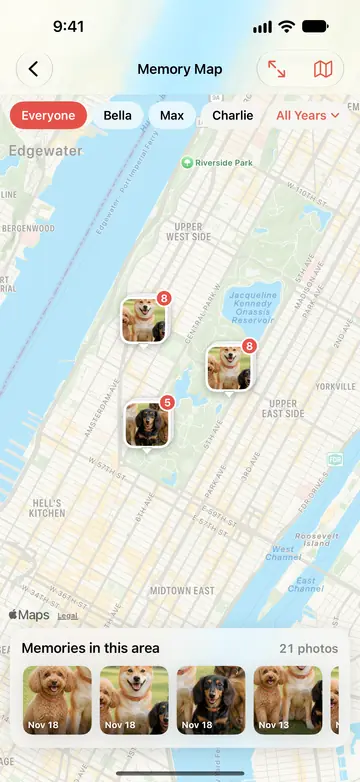
Photos and videos with a recorded location appear on the map. Your usual park or a trip away: tap a place to see the memories taken there. Filter by dog or year, and check the date, time and place of each photo.
- Photos taken close together are grouped, with a count
- When you use the in-app camera, allow location access to record the place too
- You can take photos without allowing it, and your location is never tracked continuously
Memories and health photos, kept apart
Poop photos and photos of things that concern you, like skin, are saved separately from Memories. In the Album you can switch between Memories, Poop, Condition and All, so they never get mixed in with your precious memories.
Memories
Walks, outings, a sleepy face on an ordinary day. They appear in the Growth Album, on the Memory Map and in automatic look-backs.
Poop
Saved with the details of that time. Look back at them from the Health Summary and PDF too.
Condition
For photos of things that concern you, like skin or eyes. Handy when you want to show the vet.
The album, Memory Map and photo and video logging are Family Plan features.
Album FAQ
Can I add photos from the iPhone Photos app?
Yes. Choose several photos and videos at once and add them to that day's log. You can also take them with the in-app camera.
My photos don't appear on the Memory Map.
The Memory Map shows Memories photos and videos that have a recorded location. Photos taken while location was turned off for the iPhone camera, photos whose location you removed when choosing them, and screenshots won't appear.
When you take memories with the in-app camera, allow location access to record where they were taken.
Will poop photos get mixed in with my memories?
No. Poop photos and photos of things that concern you are saved separately from Memories, and in the Album you can switch between types to look back.

Start keeping your dog's everyday moments today.
Wanko Diary is a free iPhone app.
The Family Plan is a one-time purchase, with no subscription.
Requires an iPhone with iOS 17 or later.